7 Best CB Radios for Truckers (October 2026)
The best CB radios for truckers include the Cobra 29 LTD Classic for everyday truck communication, the Uniden PRO520XL for crowded truck cabs, and the Cobra 29 LTD Chrome for matching chrome interiors.
On this page (7 sections)
- Which is the best CB radio for truckers in each setup?
- What should truckers settle before buying a CB radio?
- How should you plan the antenna and power connection?
- How do you set up a truck CB radio for clear calls?
- What mistakes reduce CB usefulness on the road?
- How do you care for a CB installation between trips?
- Which CB radio should a trucker choose now?
The Cobra 29 LTD Classic is the best CB radio for truckers who want a permanent AM/FM setup with receiver adjustment and antenna-check tools. Choose the compact Uniden PRO520XL when mounting room is scarce, or the Uniden Bearcat 980 SSB when your contacts use sideband.
Start with the people you need to reach and the space you can use. Weather tools and extra audio controls become useful once those basics are settled.
For options beyond these truck-focused picks, see our guide to the best CB radios.
Our picks at a glance
-
1
-
2

-
3

Which is the best CB radio for truckers in each setup?
The Cobra 29 LTD Classic is the strongest starting point for everyday truck communication. The other choices earn their place through compact fit, sideband, weather reception or a control layout that better suits your work.
We compared operating modes, receiver adjustments, antenna-check features and installation needs. The order favors common truck setups, so a lower-ranked radio can still be the right choice for a specific route or cab.
| Product | Best for | Modes | Channels | Antenna check | Our score |
|---|---|---|---|---|---|
| Cobra 29 LTD Classic | everyday truck communication | AM/FM | 40 | SWR calibration | 9.3 |
| Uniden PRO520XL | crowded truck cabs | 40-channel CB | 9.1 | ||
| Cobra 29 LTD Chrome | matching chrome interiors | AM/FM | 40 | SWR calibration | 8.9 |
| Uniden Bearcat 980 SSB | sideband convoy contacts | SSB capability | 40 | 8.8 | |
| Uniden PC78LTXFM | adjusting cab audio | AM/FM | 40 | 8.2 | |
| Cobra 29LX | changing weather routes | AM/FM | 40 | 8.0 | |
| Uniden PC68LTXFM | familiar knob controls | AM/FM | 40 | 7.8 |
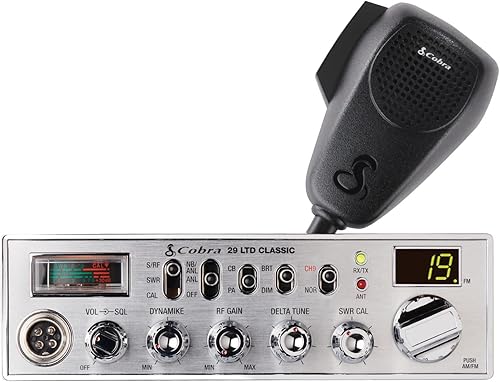
Cobra 29 LTD Classic
- AM/FM modes
- RF Gain receiver adjustment
- SWR antenna calibration
- Instant Channel 9
A practical first choice for a permanent truck installation, with receiver adjustment and antenna-check tools. Choose it when everyday communication matters more than weather extras or sideband.
Pros
- AM and FM modes
- RF Gain adjustment
- SWR calibration and antenna warning indicator
Cons
- Needs room for a full-size installation
- Not water resistant
The Cobra 29 LTD Classic suits a driver building a permanent radio station in one truck. Its AM/FM operation, RF Gain and SWR calibration cover communication, receiver adjustment and antenna checks without making weather features the main attraction.
It provides 40 channels, instant Channel 9 access and an illuminated antenna warning indicator. The included microphone has a 9-foot cable, which needs a clear route to its hanger without crossing other controls.
Allow for a body measuring 9.25 in deep by 7.25 in wide by 2.25 in high, plus rear connections and bracket clearance. A shelf that barely holds the case can still leave too little room for the antenna cable.
Choose it if you want practical controls and have space for a full-size radio. Skip it if your main need is a compact mount, sideband contacts or built-in weather scanning, since other picks address those needs more directly.
Uniden PRO520XL
- Compact construction
- RF Gain control
- Automatic Noise Limiter
- External speaker and PA support
A compact choice when other cab equipment leaves little mounting room. Its core receiver controls and external speaker jack suit a straightforward communication setup.
Pros
- Compact construction
- Automatic Noise Limiter
- External speaker jack
Cons
- Antenna sold separately
- PA use requires an optional PA speaker
The Uniden PRO520XL makes sense when a truck GPS, switches and storage already occupy the easiest mounting spots. Compact construction is its main advantage, especially if a larger radio would force an awkward location.
RF Gain, squelch and volume let you manage normal listening, while the Automatic Noise Limiter provides another way to address noise. Its front microphone connection also matters when comparing mounts with limited clearance beside the radio.
The external speaker jack gives you an option if the mounting position makes the built-in sound hard to hear. Its PA function requires a separate PA speaker, so choose that accessory only if speaking outside the truck serves a real purpose.
Buy the PRO520XL for a simple installation with core controls. Skip it if built-in antenna calibration or sideband is central to your plan, and remember that its required CB antenna is sold separately.
Our CB radio installation guide covers placement, antenna mounting and cable routing.
Cobra 29 LTD Chrome
- AM/FM modes
- RF Gain receiver adjustment
- SWR antenna calibration
- Instant Channel 9
Choose this version when a chrome finish suits your cab and you want the Classic's core communication controls. The finish is the reason to favor it over the Classic.
Pros
- AM and FM modes
- RF Gain adjustment
- SWR calibration
Cons
- Same mounting-space needs as the Classic
- Not water resistant
The Cobra 29 LTD Chrome suits a driver who wants the Classic's core controls in a finish that matches the cab. Chrome appearance is the clear reason to choose between these two Cobra versions.
Both provide the same main communication and antenna-check features described above. There is no practical reason here to choose the Chrome version expecting a different class of everyday communication.
It also has the same body dimensions as the Classic, so changing versions will not solve a tight mounting problem. Check the bracket location and microphone reach before deciding that the front panel looks right in your truck.
Choose this model if you like the finish and already know a full-size 29 LTD fits your setup. Skip it if weather access, sideband or a smaller case would make a larger difference to your work.
Keep it in a dry cab location. It is not water resistant, so avoid spots exposed to an open window or wet gear.
Uniden Bearcat 980 SSB
- SSB capability
- NOAA weather channels
- Seven-color display
- Noise-canceling microphone
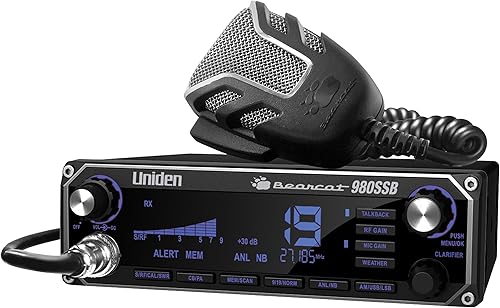
The choice for drivers whose contacts use sideband, with weather reception and an illuminated control panel. Buy it for those needs rather than assuming SSB improves every conversation.
Pros
- SSB capability
- NOAA weather channels
- Integrated SWR
Cons
- Sideband contacts need a matching mode
- Weighs 4 lb
The Uniden Bearcat 980 SSB is for drivers who have specific sideband contacts in mind. Ask your group which mode it uses before buying, because sideband capability has little value when everyone you need stays on another mode.
NOAA weather channels make it useful for listening to local forecasts during a long trip. Weather reception is separate from a CB conversation, so plan when to check conditions rather than assuming both will be heard at once.
The illuminated panel, laser-etched keys and 7 display color options give you choices for cab visibility. Uniden says the noise-canceling microphone reduces background noise, though microphone position and speaking technique still matter.
An integrated SWR function supports antenna checks, and the radio is compatible with Uniden's BC906W wireless microphone. Treat wireless compatibility as an accessory option, not a reason to buy equipment you do not need.
Choose it for sideband use with weather access. Skip it if a basic local conversation is your whole goal and you want fewer operating choices.
Uniden PC78LTXFM

- AM/FM modes
- Integrated SWR meter
- RF and microphone gain
- Hi Cut and NB/ANL controls
Separate receiver and microphone adjustments suit drivers who want control over incoming and outgoing audio. Hi Cut and noise controls add ways to manage distracting sound.
Pros
- Separate RF and microphone gain
- Integrated SWR meter
- Hi Cut and Noise Blanker/Automatic Noise Limiter
Cons
- Not water resistant
- More controls to learn than a basic setup
The Uniden PC78LTXFM suits drivers who want separate control of reception and microphone input. RF Gain changes receiver sensitivity, while microphone gain controls input from your voice, so the two adjustments solve different problems.
Its Hi Cut switch and Noise Blanker/Automatic Noise Limiter add ways to manage distracting sound. Use each control for a clear reason instead of turning every noise feature on and assuming the result must be better.
AM/FM operation and an integrated SWR meter make it a direct alternative to the Cobra 29 LTD models. The useful distinction is whether you prefer this arrangement of audio controls.
A DC cord, microphone, mounting brackets and hardware are included. Plan the antenna system separately rather than treating the mounting hardware as the whole installation.
Choose the PC78LTXFM if you are willing to learn its controls and use them deliberately. Skip it if you mainly want a small radio that you can set once for routine local communication.
Cobra 29LX

- AM/FM modes
- NOAA weather channels and alerts
- Selectable four-color LCD
- Radio Check diagnostics
Weather scanning and alerts suit drivers moving through changing conditions. Radio diagnostics and adjustable display settings also help with routine checks and cab visibility.
Pros
- Weather scan and alerts
- Radio Check diagnostics
- Day and night display settings
Cons
- Needs room for a full-size installation
- Weather reception depends on local coverage
The Cobra 29LX is the pick for drivers who want weather scanning and alerts alongside ordinary CB communication. Its weather receiver automatically seeks a clear weather channel, a useful feature when moving between coverage areas.
Radio Check diagnostics cover RF output, SWR and vehicle battery voltage. Those readings can help narrow an installation problem, but an antenna warning still calls for checking the mount, cable and connections.
The 4-color LCD has day and night settings. Set brightness while parked so the screen remains readable without adding unnecessary glare after dark.
Other features include channel scanning, memory channel programming, a clock, an alarm and instant access to Channels 9 and 19. Choose the functions you will actually use instead of giving every extra equal weight.
Buy the 29LX if weather information and diagnostics justify a fuller feature set. Skip it if simple controls or limited mounting room matter more, and keep another source of urgent weather information available.
Uniden PC68LTXFM

- AM/FM tuner
- Integrated SWR meter
- RF and microphone gain
- Noise Blanker/Automatic Noise Limiter
A conventional control layout suits drivers who prefer separate adjustments and an LED channel indicator. Compare its fit and control placement with the PC78LTXFM before choosing.
Pros
- Separate receiver and microphone adjustments
- Integrated SWR meter
- LED channel indicator
Cons
- Not water resistant
- Few clear feature differences from the PC78LTXFM
The Uniden PC68LTXFM suits drivers who prefer separate knobs and a clear channel indicator. Its squelch control and microphone gain let you set the listening threshold and voice input independently.
The feature mix overlaps heavily with the PC78LTXFM, including AM/FM, an integrated SWR meter, Hi Cut and noise controls. Choose between them by actual mounting fit and control placement rather than assuming a higher model number means better communication.
Before ordering, confirm the space needed for the radio, bracket and connected cables. Avoid choosing a mounting spot from a front-panel photo alone.
The unit weighs 3.7 lb, so use a secure mounting surface that can support the radio over rough roads. Keep the microphone hanger within easy reach while keeping the cord clear of the seat and pedals.
Choose it if this control layout fits your habits and cab. Skip it if you need a clearly different capability, such as sideband or weather scanning, because those needs point to other radios here.
What should truckers settle before buying a CB radio?
Settle who you need to contact, where the radio will fit and how the antenna will mount before comparing extras. These choices determine whether a radio will serve your route better than another model.
How do you choose the best trucker CB radio for your contacts?
Choose a radio around the mode your regular contacts use. Ask dispatch, route partners or the drivers at your usual work sites before making an unfamiliar mode your priority.
Two radios need a matching channel and mode to hold a normal conversation. For sideband, the operators also need to agree on the same sideband.
AM/FM gives you another mode option, but FM does not make every nearby CB user reachable on FM. Likewise, SSB is a useful communication tool when your contacts use it, not an automatic upgrade for all local traffic.
Our Cobra vs Uniden CB radio comparison can help once you have narrowed down the operating features you need.
Will the controls and microphone fit your cab?
Measure the whole installation, including the rear cable bend, bracket and microphone plug. Leave enough room to remove the radio for service without dismantling nearby equipment.
Sit in your normal driving position while parked and check the display angle. A radio mounted low or far to one side can be awkward even when the case fits neatly.
Give the microphone a secure hanger and check its reach with the seat adjusted. A cord should not pull across the steering wheel, snag a shift control or hang into the footwell.
If you drive an assigned fleet truck, confirm which mounts and power connections are allowed. Our guide to choosing a CB radio for a truck helps connect radio features with installation choices.
Which noise controls will you actually use?
Start with squelch and receiver sensitivity rather than assuming a louder speaker will solve unclear reception. Noise coming through the radio and road noise inside the cab need different fixes.
Squelch sets the point at which the speaker opens. Raising it too far creates quiet listening at the cost of missing weaker calls.
RF Gain adjusts receiver sensitivity, which can help when strong nearby signals dominate. Turning it down too far can also hide stations you want to hear.
Noise blankers and limiters address certain kinds of electrical interference. They cannot repair a loose antenna connection, and maximum microphone gain cannot make up for poor microphone technique.
Are weather tools worth choosing over simpler controls?
Choose weather reception when you will use it to check conditions along your route. Weather scanning and alerts are more relevant to that job than display colors or extra clock functions.
Do not assume that access to weather broadcasts means every warning will reach you. Reception depends on local coverage, and you still need to listen for the area and timing that apply to your trip.
Display choices matter when the radio's position creates glare or a poor viewing angle. A color menu should support readable controls rather than become the main reason to choose a radio.
How should you plan the antenna and power connection?
Treat the radio, antenna, coax cable and power supply as one system. A more elaborate radio cannot make up for a damaged cable, unsuitable mount or poor electrical connection.
Pick an antenna mount that suits the truck
Choose the antenna location around clearance, a secure mount and the antenna's installation requirements. Truck body materials and mounting surfaces can affect which antenna system is suitable.
Check the highest point of the installation against the places you drive. Loading areas, branches and low structures can damage an antenna that clears normal highway obstacles.
Follow the antenna maker's guidance for the mount and ground plane. A chassis connection and the antenna's radio-frequency ground-plane needs are related installation concerns, but they are not interchangeable instructions.
Route coax away from pinch points and sharp edges. Protect it where it passes through panels, and leave connectors accessible for inspection.
Match the power source before connecting
Confirm the radio's required DC supply and polarity before connecting it to truck wiring. Do not assume a convenient socket or existing wire is the right source.
Use the specified fuse arrangement and a secure connection. Keep wiring clear of hot surfaces, moving parts and locations where cargo or seat movement can damage it.
If vehicle wiring is unfamiliar, have a qualified installer make the connection. A tidy installation should allow both safe operation and easy access to the fuse.
Check SWR before routine transmission
Check the antenna match using the radio's instructions and an appropriate SWR meter. A built-in SWR function still requires the correct calibration steps; it does not physically adjust the antenna for you.
Take readings in an open location with the antenna in its normal operating position. Nearby metal structures can affect a reading, so a cramped loading bay is a poor place to make the final adjustment.
If SWR is high, stop and inspect the antenna system before continuing routine transmission. Check connectors, cable damage and mount requirements rather than repeatedly adjusting radio knobs.
How do you set up a truck CB radio for clear calls?
Make the first adjustments while parked, then ask another station for a short report on your voice. Change one setting at a time so you can tell which change helped.
- Check the channel and mode. Match the station you want to reach before changing audio controls.
- Set a comfortable listening volume. Avoid using excessive volume to cover an unsuitable speaker location.
- Open squelch, then raise it gradually. Stop just beyond the background noise threshold and revisit it if conditions change.
- Set receiver and microphone controls as directed. Start from the manual's recommended settings rather than turning gain controls fully clockwise.
- Speak clearly at the recommended microphone distance. Shouting or pressing the microphone against your mouth can make your words harder to understand.
- Ask for a brief radio check. Give your location and request a clear response without holding the channel longer than needed.
For the top pick, our Cobra 29 LTD Classic settings guide explains the controls in more detail.
Listen before transmitting and leave a pause between calls so another driver can speak. Our guide on how to use a CB radio covers basic operation and channel habits.
CB can help you ask nearby drivers for road information, but treat reports as local observations. Confirm the direction, location and timing before acting on a call about traffic or a blocked road.
Instant Channel 9 access is a shortcut to that channel, not a promise that someone is monitoring it. Use available emergency services when you need urgent help.
What mistakes reduce CB usefulness on the road?
The biggest mistakes are buying by a range claim, hiding weak calls with excessive squelch and ignoring antenna faults. Fix those basics before replacing a radio that seems disappointing.
Buying by the largest distance figure
Usable range changes with terrain, obstructions, antenna placement and noise. Two drivers with the same radio can have different results because their installations and surroundings differ.
Choose a radio for compatible modes and usable controls. Plan the antenna around your truck instead of treating a maximum-distance number as a route-wide promise.
Turning every adjustment to maximum
Maximum microphone gain can make speech less clear, while excessive squelch or reduced RF Gain can hide incoming calls. Quiet audio does not always mean the receiver is set well.
Adjust one control at a time and ask a nearby contact for a voice report. If the problem changes with engine speed or another accessory, investigate electrical noise rather than repeatedly raising volume.
Using PA mode as a communication feature
PA sends your voice to a suitable external PA speaker. It does not extend CB range or make other radios hear you more clearly.
Buy PA equipment only for a task such as speaking to someone outside the truck. Keep ordinary CB communication and local loudspeaker use separate in your setup plan.
How do you care for a CB installation between trips?
Inspect mounts, cables and microphone connections during routine cab checks. A loose bracket or damaged cable is easier to address before it becomes a communication problem on the road.
Look for coax pinched by doors, worn insulation near sharp edges and connectors loosened by vibration. Check the microphone cord where it bends or pulls against its plug.
After an antenna strike or a change to its mounting position, check the antenna match again. Moving the antenna can change the system even if the radio settings stay the same.
Keep vents clear and clean the radio with a dry, soft cloth. Avoid spraying cleaner into controls, and keep drinks or wet clothing away from the case and connections.
Note the settings that work for your usual route. If another driver changes them, a simple reference makes it easier to restore your preferred starting point.
Which CB radio should a trucker choose now?
Choose the best CB radio for truckers around your first limiting need. That might be contact compatibility, mounting space or access to weather information.
- Choose the Cobra 29 LTD Classic for a permanent everyday setup with practical receiver and antenna controls.
- Choose the Uniden PRO520XL when a larger radio would force an awkward mount.
- Choose the Cobra 29 LTD Chrome when you want the Classic's core features in a finish that suits your cab.
- Choose the Uniden Bearcat 980 SSB when your intended contacts use sideband.
- Choose the Uniden PC78LTXFM when separate audio adjustments are a priority.
- Choose the Cobra 29LX when weather scanning and diagnostics serve your route.
- Choose the Uniden PC68LTXFM when its conventional control layout fits your preferences.
Before ordering, write down your available mounting space, your contacts' usual mode and your antenna plan. If distance is still the deciding concern, review what affects CB radio range before choosing the radio and antenna together.
Our top 3 picks at a glance
-
1
-
2
-
3
Frequently asked questions
What is the best CB radio for truckers?
The Cobra 29 LTD Classic is the best starting point for most fixed-mount truck installations because it combines useful receiver controls with antenna calibration. Choose a different model when one need takes priority: the PRO520XL for limited space, the Bearcat 980 SSB for sideband contacts, or the 29LX for weather scanning.
Do truckers need an AM/FM CB radio?
Truckers need a mode that matches the drivers they want to contact; AM/FM gives you both options, but both ends must use the same mode and channel for a conversation. Ask your regular work group what it uses before making FM a deciding feature in your next radio.
Does a CB radio include the antenna?
Don't assume a CB radio includes an antenna; the Uniden PRO520XL requires one sold separately. Plan the antenna, mount and coax cable along with the radio itself; a microphone and mounting bracket do not make a complete installation, and an existing truck antenna should be checked before reuse.
Is SSB useful in a truck CB radio?
SSB is useful when the stations you want to reach also use sideband; both operators must choose the same channel and sideband, and tuning needs more attention than a simple channel change. The Bearcat 980 SSB is the relevant choice here when you already have a reason to use it.
How far can a truck CB radio reach?
There is no fixed distance you can count on for every truck and route; antenna placement, terrain, nearby structures and electrical noise all affect usable communication. Our guide to how far a CB radio can reach explains why a well-planned installation matters more than a maximum-distance claim.


