Uniden Bearcat BC125AT Scanner Review: Worth It? (October 2026)
The Uniden BC125AT is a strong choice for conventional analog listening if you want named channels and organized memory banks. Confirm your target radio systems first: it cannot receive digital communications.
On this page (8 sections)
- What does the Uniden BC125AT do well?
- What should you check before buying an analog scanner?
- How does the BC125AT compare with the SR30C?
- When should you choose the Whistler WS1010?
- How should you set up the BC125AT for useful listening?
- Which scanning mistakes cause the most trouble?
- How do you care for a handheld scanner?
- Should you buy the Uniden BC125AT or an alternative?
The Uniden BC125AT is a strong choice for conventional analog listening if you want named channels and separate banks for different interests. Buy it after confirming what you want to hear, because it cannot receive digital systems such as Project 25, DMR or NXDN.
Its clearest advantage is organization. You can build a useful listening plan around local services, rail activity, aviation or other compatible transmissions without relying on frequency numbers to remember every channel.
The Uniden Bearcat SR30C is worth comparing for desk listening with USB power. The Whistler WS1010 takes a different approach, with weather alert features that may matter more than extra channel memory.
What does the Uniden BC125AT do well?
The BC125AT makes a growing collection of analog frequencies easier to manage through 500 alpha-tagged channels in 10 storage banks. That combination suits listeners who follow more than one service or travel between several listening areas.
Uniden Bearcat BC125AT
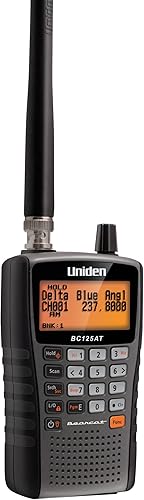
- 500 alpha-tagged channels
- 10 storage banks
- Close Call RF capture
- Analog only
Named channels and separate memory banks suit listeners who follow several analog services or locations. Civil and military air search presets also give aviation listeners a useful starting point.
Pros
- Alpha tags identify saved channels
- Separate banks organize locations or services
- Close Call includes Do Not Disturb mode
- Rechargeable AA batteries and antenna included
Cons
- Cannot monitor digital radio systems
- Receive-only operation does not allow replies
A useful channel name tells you what you're hearing at a glance. Use short labels that identify the service and role, such as an airport name plus “Tower,” rather than a vague label such as “Air.”
Banks let you separate groups you don't always want to hear together. You might keep home-area channels apart from a rail group or frequencies saved for an occasional trip.
Its search presets cover non-digital police, fire and emergency services, ham, marine, railroad, civil and military air, CB, FRS/GMRS/MURS, and racing. These are starting points for finding activity, rather than a ready-made directory of active local channels.
Close Call RF capture tunes to signals from nearby transmitters. Do Not Disturb mode prevents Close Call checks during a transmission, which is useful when you want to follow the current conversation without those checks interrupting it.
The orange backlit display helps in low light. An antenna, USB cable and 2 rechargeable AA Ni-MH batteries are included, so you don't need to choose batteries separately before your first listening session.
Who should buy the Uniden BC125AT?
Choose the BC125AT if channel names and clear grouping matter to your daily listening. It fits someone who wants to build a saved collection of compatible frequencies and return to those channels regularly.
Aviation listeners should consider it if their target channels fall within its supported coverage. Civil and military air presets offer a starting point, but check the actual frequencies you want before committing.
Skip it if your main goal is hearing an agency that uses an incompatible digital system. Also skip it if you need to talk back: this is a receiver, not a two-way radio.
What should you check before buying an analog scanner?
Confirm system type, frequency coverage and local activity before comparing convenience features. A scanner can cover a frequency without supporting the radio system using it.
Start with a short list of what you actually want to hear. “Local fire dispatch” or “the nearby airport tower” is more useful than a broad goal such as “everything around me.”
For each target, check:
- Radio format: Is it conventional analog, or does it use a digital format?
- System structure: Does it use individual conventional channels or a trunked system that requires compatible tracking?
- Frequency: Is the channel within the receiver's coverage?
- Availability: Is the channel active and accessible from your listening location?
The BC125AT covers 25–54 MHz, 108–174 MHz, 225–380 MHz and 400–512 MHz. Notice the gaps between those ranges rather than treating it as continuous coverage.
Use reliable local or official sources to identify current systems, then check compatibility through Uniden's support resources. An old frequency list can be a research lead, but it shouldn't be your only reason to buy.
A better antenna cannot add a missing radio format or trunking capability. If your target service has changed systems, read how scanners work with digital systems before choosing hardware.
Encryption is another separate limit: a scanner cannot make encrypted voice traffic understandable. Avoid buying any receiver on the assumption that every police channel will be available.
How does the BC125AT compare with the SR30C?
Choose the BC125AT for labeled channel organization and consider the SR30C for USB-powered listening with priority and delay controls. Both support PC programming and nearby-signal discovery through Close Call.
The SR30C stores 500 channels and includes presets in 10 service banks. Its preset searches include NOAA weather, marine, racing, civil aircraft, ham, railroad, CB and non-digital public safety services.
Its Priority Scan function checks channels you designate as priorities. The delay function helps catch replies by pausing before scanning resumes after a transmission ends.
| Buying priority | BC125AT | SR30C |
|---|---|---|
| Organizing saved channels | Alpha tags and separate storage banks | PC programming and keypad entry |
| Nearby-signal discovery | Close Call with Do Not Disturb mode | Close Call |
| Following selected traffic | Named channels help identify activity | Priority Scan and delay function |
| Power planning | Rechargeable AA batteries included | USB power or AA batteries; batteries not included |
| Main compatibility limit | Conventional analog reception | Analog reception |
The SR30C can run from a computer or another USB power source, such as a phone charger. It also accepts 2 AA alkaline or rechargeable Ni-MH batteries and can charge suitable Ni-MH cells in the unit using USB.
That makes it a sensible option for a regular listening spot near a power source. Its memory backup also keeps saved frequencies for an extended time after power is lost.
Choose it if those power and scan controls match your routine. Skip it if your reason for replacing another analog scanner is a move to digital radio, because the SR30C won't solve that problem.
When should you choose the Whistler WS1010?
Choose the WS1010 when county-specific weather alerts and storm spotter access are central to your plans. Its weather features provide a clearer reason to choose it than its general scanning memory.
Whistler WS1010

- 400 channels
- 10 memory banks
- SAME weather alerts
- Skywarn access
County-specific weather alerts and access to storm spotter frequencies make weather monitoring its clearest role. PC programming requires a PCIF cable and third-party software.
Pros
- SAME and All Hazards weather alerting
- Skywarn function
- Spectrum Sweeper finds nearby transmissions
- Separate banks organize saved frequencies
Cons
- Fewer channels than either Uniden
- PCIF cable and third-party software required for PC programming
SAME and All Hazards weather alerting displays events and sounds alerts for specific counties. The Skywarn function gives access to frequencies used by storm spotter networks.
Set the relevant county information carefully and review the alert instructions before relying on those features. Keep access to official local alerts as well, since reception and power can fail.
For general listening, it stores 400 frequencies in 10 memory banks. Service banks cover marine, fire and police, aircraft, ham and weather, while Spectrum Sweeper searches for transmissions from nearby sources.
The smaller memory is unlikely to be the deciding factor if you keep a focused set of local channels. A shorter, useful scan list is easier to follow than hundreds of entries you rarely need.
PC setup needs more planning here. The WS1010 requires a PCIF cable and third-party software for computer programming, so include those requirements in your decision if you want to manage channels that way.
It includes 4 AA batteries. Choose it for its weather role; skip it if you mainly want the BC125AT's named-channel workflow or need digital reception.
The best police scanner guide can help if these analog handhelds don't match your target systems.
How should you set up the BC125AT for useful listening?
Begin with a few confirmed local channels, then expand once you can receive and identify them. Filling the memory first makes reception problems harder to sort out.
- Choose one listening goal. Start with one service or location rather than several unrelated search bands.
- Check the frequencies and format. Confirm that each channel is conventional analog and within coverage.
- Fit the antenna and prepare power. Follow the manual for battery installation and charging.
- Enter a small channel group. Add useful names as you go.
- Adjust volume and squelch. Set squelch just high enough to stop background noise when no signal is present.
- Listen before adding more. Check that the names, frequencies and grouping make sense.
Squelch set too high can hide weaker signals. Set too low, it can leave the scanner stopped on noise instead of moving through your channels.
If a channel stays silent, hold on that known frequency when activity is expected. Then try a different position, such as near a window, before changing several settings at once.
A silent channel may simply be idle. Radio traffic is often brief, so a few quiet minutes don't prove that your setup is wrong.
Use the guide to programming a Uniden Bearcat scanner for the next steps once you've confirmed compatibility. Keep a separate copy of your frequency names and groups so you can rebuild or revise them without starting over.
Which scanning mistakes cause the most trouble?
The biggest mistake is buying for a service name instead of its actual radio system. A “police” preset doesn't mean every police department is compatible or within reach.
Another mistake is scanning too many unrelated channels at once. While the receiver is stopped on one transmission, activity can occur elsewhere, so keep each session focused on what matters most.
Treat Close Call as a discovery aid rather than a replacement for saved channels. It needs nearby activity, and it won't reveal a transmitter that isn't sending anything.
Don't expect one fixed reception distance. Terrain, buildings, transmitter height, signal strength and your antenna position all affect what you can hear.
Finally, separate listening from communication. If your real goal is speaking with another driver or a group, the CB radio versus two-way radio guide explains the equipment choice more clearly than a scanner comparison.
How do you care for a handheld scanner?
Protect the antenna connection, battery compartment and controls, and follow the manual's power instructions. Routine care is mostly about avoiding damage and keeping a dependable power plan.
Carry the scanner by its body rather than its antenna. Remove an attached cable gently instead of pulling the scanner away from it.
Keep it dry, wipe the outside with a soft cloth and avoid leaving it in a hot parked vehicle. Remove batteries before long storage and inspect the compartment for leakage or dirty contacts.
Use the correct battery type and charging settings. Never attempt to charge disposable alkaline cells, and replace damaged rechargeable batteries rather than continuing to use them.
For vehicle listening, plan a secure location that doesn't obstruct the driver or leave cables loose. The police scanners for cars guide covers that use case in more detail.
Should you buy the Uniden BC125AT or an alternative?
Buy the Uniden BC125AT for a named, organized collection of conventional analog channels. Confirm your target systems first, then begin with a small bank you can receive reliably.
Choose the SR30C if USB-powered desk listening, priority checks and a pause for replies better match your routine. Choose the WS1010 if county-specific weather alerts and storm spotter access are your main reason for buying.
If your main target uses an incompatible system, take that model off your shortlist before comparing memory or accessories. Browse the scanners category to find the next guide that matches your listening goal.
Uniden Bearcat BC125AT: See it on Amazon
Uniden Bearcat SR30C: See it on Amazon
Whistler WS1010: See it on Amazon
Frequently asked questions
Can the Uniden BC125AT receive digital police radio?
No, the BC125AT cannot receive digital police radio, including Project 25, DMR or NXDN; it suits conventional analog channels, so confirm the system used by each agency you want to hear before buying. More memory, a different antenna or new programming cannot add digital reception.
How many channels does the BC125AT have?
The BC125AT stores 500 channels across 10 storage banks; alpha tags let you name saved channels instead of relying on frequency numbers alone. Arrange banks by location or service, then keep your everyday scan list focused on the channels you actually want to follow.
Does the BC125AT transmit?
No, the BC125AT receives transmissions only and cannot send a reply; choose it for listening to compatible radio traffic, rather than communicating with another person. If you need to talk with a travel group or work crew, choose a two-way radio suited to that service.
What is Close Call RF capture?
Close Call RF capture tunes to signals from nearby transmitters; on the BC125AT, Do Not Disturb mode prevents those checks during a transmission. Use it to help discover nearby activity, but keep known frequencies saved for regular listening because a quiet transmitter gives it nothing to find.