8 Best Police Scanners (October 2026)
The best police scanners for analog and digital listening include the Uniden Bearcat BC125AT for organized analog listening, the Uniden SDS100 for simulcast area listeners, and the Uniden BC365CRS for bedside analog listening.
On this page (7 sections)
- Which police scanners fit different listening needs?
- Best police scanner picks by use
- What must match your local radio system?
- How should you choose the format and features?
- How do you set up a police scanner without getting buried in channels?
- What care and listening habits prevent common problems?
- Which best police scanner pick should you buy?
The best police scanner for confirmed conventional analog channels is the Uniden Bearcat BC125AT. For compatible digital systems where simulcast or weak signals are a concern, choose the Uniden SDS100 instead.
Start with the agency you want to hear, not the scanner's channel count. A receiver must support that agency's radio system, and no model here makes encrypted traffic understandable.
For background on changing networks, read whether police scanners still work after agencies go digital. If you plan to listen on the road, review police scanner laws in a car.
Our picks at a glance
-
1
-
2

-
3

Which police scanners fit different listening needs?
Choose by local system compatibility first, listening location second. A portable analog receiver, a digital handheld and a fixed mobile unit solve different problems.
SincereSconce compared supported systems, programming methods, power needs and listening features. The scores reflect those differences, but a higher score never makes an incompatible scanner the right purchase.
| Product | Best for | Type | Channel storage | Main use | Our score |
|---|---|---|---|---|---|
| Uniden Bearcat BC125AT | organized analog listening | Analog handheld | 500 | Named conventional analog channels | 9.2 |
| Uniden SDS100 | simulcast area listeners | Digital handheld | Compatible digital systems in challenging reception areas | 8.8 | |
| Uniden BC365CRS | bedside analog listening | Desktop analog | 500 | Home listening with clock and FM functions | 8.7 |
| Uniden BCD436HP | replaying missed calls | Digital handheld | Digital listening with recent-transmission replay | 8.6 | |
| Uniden Bearcat SR30C | casual analog outings | Analog handheld | 500 | Portable conventional analog listening | 8.5 |
| Uniden BC355N | analog vehicle setups | Analog base/mobile | 300 | Conventional analog listening at home or in a vehicle | 8.4 |
| Uniden BCD996P2 | fixed digital setups | Digital mobile/base | 25,000 dynamically allocated | Programmed digital base or vehicle installation | 8.3 |
| Whistler WS1010 | weather focused listeners | Analog handheld | 400 | Analog listening with county-specific weather alerts | 8.2 |
Best police scanner picks by use
The BC125AT leads for organized conventional analog listening, while the SDS100 addresses a different need: digital handheld reception in challenging radio environments. The remaining picks suit home listening, replay, casual outings or a planned vehicle installation.
Best police scanner for organized analog listening
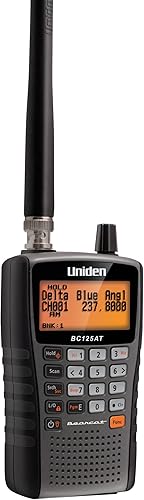
Uniden Bearcat BC125AT
- 500 alpha-tagged channels
- 10 storage banks
- Close Call RF capture
- Preset non-digital search bands
A portable choice for listeners who want to name and group conventional analog channels. Skip it if your target agency uses digital communications or trunking.
Pros
- Named channels simplify identification
- Banks organize different listening interests
- Close Call finds nearby transmitters
Cons
- Cannot receive digital communications
- Cannot follow trunked systems
The Uniden Bearcat BC125AT suits listeners building a clear, manageable channel plan. Its 500 alpha-tagged channels let you name what you're hearing, and 10 storage banks keep separate towns, departments or interests apart.
That organization matters when several frequencies sound alike. A useful channel name is easier to follow than a bare number, especially when you return to the scanner after a break.
Preset searches cover public safety and other services, including railroad, marine, civil air and military air. Close Call RF capture offers another way to discover nearby transmitters, with Do Not Disturb preventing those checks during a transmission.
Choose it for a mix of confirmed conventional analog interests rather than police listening alone. Our Uniden BC125AT review explains its fit in more detail.
Skip it if your main goal requires digital decoding or trunk tracking. Buying it as a temporary substitute makes little sense when it cannot receive the conversations that prompted your search.
Digital handheld for simulcast areas
Uniden SDS100
- True I/Q digital receiver
- Location-based scanning
- Customizable color display
- Weather-resistant JIS 4 construction
The digital handheld to prioritize when simulcast or weak-signal reception shapes your choice. ZIP-code setup helps select nearby systems, while an optional external GPS receiver supports travel.
Pros
- Receiver designed for challenging digital signals
- Customizable display fields
- Location-based system selection
Cons
- External GPS receiver is not included
- Cannot overcome encrypted communications
The Uniden SDS100 is the digital handheld to prioritize when simulcast reception is a known local concern. Uniden designed its True I/Q receiver to improve digital performance in challenging RF environments, including weak-signal areas.
Simulcast systems can send the same traffic from several sites at once. Those overlapping signals can cause decoding trouble, so receiver design matters alongside signal strength.
Location-based selection accepts a ZIP or postal code or GPS coordinates. Its HomePatrol database covers known US and Canadian systems, and Sentinel software provides access to Uniden's weekly main database updates.
The customizable color display lets you choose which information appears in different fields. Its JIS 4 water resistance adds protection against splashes, but you should still keep it out of standing water.
Choose it when reception conditions justify its specialized receiver. Skip it for a small set of conventional analog channels, and remember that travel-based automatic reselection needs an external GPS receiver that is not included.
Desktop scanner for bedside listening
Uniden BC365CRS
- 500-channel conventional analog scanner
- FM radio and alarm clock
- Weather alerts
- Preset search bands
A home scanner for conventional analog channels that also serves as an FM clock radio. Choose it for a regular listening spot rather than portable use.
Pros
- Alarm can wake you to scanning, weather or FM
- 30 FM station presets
- Backlit display for nighttime viewing
Cons
- Cannot receive digital communications
- Desktop format limits portability
The Uniden BC365CRS fits a regular listening spot beside a bed or on a desk. It combines a conventional analog scanner with an FM radio and alarm clock, so its value extends beyond scanning hours.
You can store 500 channels and save up to 30 FM stations. The alarm can wake you to scanning, a weather channel or FM, while snooze and sleep functions suit a bedside routine.
Its backlit display helps you read the screen at night. Before choosing a permanent spot, check that you can reach the controls without placing the antenna against nearby electronics.
Pick it if your local channels are compatible and you want a radio that stays in one place. It also makes sense for someone who would otherwise keep separate scanning and clock-radio devices on the same surface.
Skip it for portable outings or digital public safety systems. The clock and weather functions add convenience, but they don't expand the types of voice communications it can receive.
Digital handheld for recent-audio replay
Uniden BCD436HP

- Digital handheld with ZIP-code setup
- TrunkTracker V
- USA and Canada radio system database
- Instant Replay up to 240 seconds
A digital handheld for listeners who want database-based setup and a way to replay recent transmissions. It supports P25 Phase I and Phase II, but needs protection from water.
Pros
- ZIP-code system selection
- Instant Replay for recent audio
- Custom alerts for selected events
Cons
- Not water resistant
- Local system compatibility still needs checking
The Uniden BCD436HP suits listeners who want digital reception and a way to revisit recent calls. Instant Replay plays back up to 240 seconds, which helps when you miss a place name or the start of a conversation.
ZIP-code setup selects nearby systems from a database covering the United States and Canada. TrunkTracker V supports P25 Phase I and Phase II along with several other trunked system types.
Custom alerts can identify selected channels or events. Use a few meaningful alerts rather than assigning one to everything, so the sounds remain useful when activity increases.
Sentinel software supports database and firmware updates, while Favorites Lists let you narrow routine listening. GPS connectivity is available for location-based use.
Choose it when replay and database-based setup matter more than weather protection. It is not water resistant, so skip it for an exposed outdoor position and protect it from rain, drink spills and damp storage.
Analog handheld for casual outings
Uniden Bearcat SR30C

- 500-channel analog handheld
- Preset service banks
- PC programming
- Close Call RF capture
An entry-level handheld for casual listening to compatible analog services. USB power and AA battery options suit different listening locations, but batteries are not included.
Pros
- Preset searches for several services
- USB or AA battery power
- Delay function helps catch replies
Cons
- Cannot receive digital communications
- AA batteries are not included
The Uniden Bearcat SR30C suits casual listeners who want portable access to conventional analog services. Preset service banks give you a starting point for interests such as aircraft, racing, railroad and weather broadcasts.
Its 500-channel memory and PC programming let you move beyond broad searches once you know which frequencies matter. Close Call can find nearby transmissions, while priority scanning checks channels you designate.
The delay function is useful for following exchanges. It pauses before scanning resumes, giving the other party time to reply instead of immediately moving elsewhere.
Power choices include USB, 2 AA alkaline batteries or 2 rechargeable Ni-MH batteries. Batteries are not included, so include the right battery type in your setup plan and follow the charging instructions carefully.
Choose this model for occasional outings and a short list of known analog interests. Skip it if police communications are your only goal and the local agency uses a digital system.
Base/mobile scanner for analog vehicle use
Uniden BC355N

- Base/mobile design
- 300 stored frequencies
- Close Call RF capture
- Preset search bands
A base/mobile choice for compatible analog channels, with home and vehicle power accessories included. Skip it for any system that needs digital decoding or trunk tracking.
Pros
- Home and vehicle power accessories
- Preset service searches
- Close Call finds nearby transmissions
Cons
- Cannot receive digital communications
- Not suitable for trunking
The Uniden BC355N fits a planned analog listening position at home or in a vehicle. Its base/mobile format makes more sense than a handheld when you want the receiver to stay in a secure location.
It stores 300 frequencies alongside preset service searches. Close Call adds nearby-signal discovery, and the backlit display supports viewing in low light.
An AC adapter, DC power cable and automotive power outlet plug are included. That gives you home and vehicle power options, but you still need to plan placement, cable routing and antenna position.
Choose it for confirmed conventional analog traffic when you prefer a fixed arrangement. Skip it for trunked or digital systems, even if the frequencies themselves fall within its coverage.
For a wider look at installation choices, see our best police scanners for cars. Finish the channel plan before installing the receiver so routine listening requires fewer control changes.
Digital scanner for a fixed installation
Uniden BCD996P2

- Digital mobile scanner
- 25,000 dynamically allocated channels
- TrunkTracker V
- Location-based scanning with compatible GPS
A digital base/mobile scanner for listeners who want a planned installation and substantial channel storage. Compatible GPS equipment can select programmed systems as your location changes.
Pros
- P25 Phase 1 and Phase 2 support
- S.A.M.E. weather alerts
- GPS-based selection of programmed systems
Cons
- Requires a planned 12-volt DC power connection
- Location-based scanning needs compatible GPS equipment
The Uniden BCD996P2 suits a permanent base or vehicle setup with a planned channel program. Its 25,000 dynamically allocated channels provide room to organize several systems rather than squeeze them into a small conventional channel list.
TrunkTracker V supports P25 Phase 1 and Phase 2, X2-TDMA, Motorola, EDACS and LTR systems. It also receives conventional analog and P25 digital channels.
S.A.M.E. weather alerts use location codes to focus on relevant weather warnings. A compatible GPS receiver can select programmed systems as your location changes, which helps when a route crosses several radio coverage areas.
That GPS function depends on having the needed systems programmed first. Treat it as a way to select your program by location, rather than a replacement for preparing the program.
Choose it when you want a fixed digital receiver and can plan its 12-volt DC power connection. Skip it if your main need is carrying a scanner between rooms or taking it along on foot.
Analog handheld for weather interests
Whistler WS1010

- 400-channel analog handheld
- SAME weather alerts
- Skywarn function
- PC programming
An analog handheld for listeners who place weather broadcasts and storm-spotter frequencies high on their list. PC programming needs a PCIF cable and third-party software.
Pros
- County-specific SAME weather alerting
- Skywarn frequency access
- Spectrum Sweeper searches for nearby signals
Cons
- Analog only
- PC programming requires separate cable and software
The Whistler WS1010 suits listeners who put weather monitoring alongside conventional analog radio. Its SAME and all-hazards alerting can identify weather events for specific counties, while Skywarn provides access to storm-spotter frequencies.
You can store 400 frequencies across 10 memory banks. Service banks cover fire and police, marine, aircraft, ham and weather, while Spectrum Sweeper searches for nearby sources.
The practical appeal is keeping several related interests in one handheld. For example, you can separate local analog channels from weather and spotter frequencies instead of scanning every interest continuously.
PC programming requires a PCIF cable and third-party software. Account for that extra setup if computer-based entry and backups are important to you.
Choose it when those weather functions match your listening plan. Skip it for digital agency traffic, and keep official local alerts available through another route rather than relying on a scanner as your only warning source.
What must match your local radio system?
Match the voice format, system type and encryption status before comparing convenience features. Write down the exact agency and dispatch channel you want, since police, fire and nearby towns may use different arrangements.
Separate conventional channels from trunked systems
A conventional system assigns communications to specific channels. A trunked system shares a pool of frequencies, so a compatible scanner must follow the selected talkgroups as conversations move.
Entering one trunked voice frequency as a conventional channel can produce fragments of unrelated traffic. For trunked listening, identify the system, relevant site and talkgroups rather than collecting frequencies alone.
Digital and trunked are separate terms. A scanner's ability to receive analog voice does not mean it can follow analog trunking, and digital reception does not imply support for every digital format.
Check the exact digital format
Match the full format name, including the phase where relevant. P25 Phase I and Phase II are distinct compatibility details, and support for P25 does not imply support for DMR or NXDN.
Use a current local frequency reference and the scanner's supported-system information. If the agency has moved systems, an older frequency can remain easy to find online while no longer carrying the dispatch traffic you want.
Check the channels you want for encryption
Encrypted communications are a buying stop if they are your sole listening goal. More storage, a stronger signal or a different antenna cannot make encrypted speech understandable.
Check individual talkgroups where possible. One department may have some accessible traffic and other channels that are encrypted, so a broad statement about the whole county may be misleading.
How should you choose the format and features?
Choose the physical format around your normal listening routine, then add features that reduce effort. Avoid paying for capabilities that don't solve a problem in your channel plan.
Handheld or fixed receiver?
A handheld suits moving between rooms, occasional outings and listening away from a permanent desk. Consider how you'll carry it, protect it and keep it powered during the time you actually listen.
A desktop or base/mobile receiver suits a stable location with planned power and antenna placement. Measure the available space and leave room to reach controls and connect cables without sharply bending them.
If your goal includes speaking with other people, read CB radio versus two-way radio. A scanner serves a listening role, so decide whether reception alone meets your needs.
Database setup or manual programming?
Database-based location setup helps you begin without entering each nearby frequency by hand. It can also select more activity than you want, so expect to narrow the result after initial setup.
Manual entry works well for a small conventional channel list. PC programming becomes more useful when names, banks and multiple locations make keypad entry slow or hard to review.
Check software needs before choosing a model. A programming feature may require a particular cable, separate software or a compatible computer.
Storage, replay or discovery?
Channel storage helps organize known interests; it does not determine reception range. A focused list of useful channels is often easier to follow than hundreds of unrelated ones.
Replay helps recover words from recent audio. Nearby-signal capture and broad service searches help discover activity, but neither guarantees finding a distant agency or identifying every transmitter you hear.
Priority checks and scanning delays serve different purposes. Priority favors selected channels, while delay gives a conversation time for a reply before the scanner moves on.
How do you set up a police scanner without getting buried in channels?
Begin with one agency, one location and a short listening list. Establish that the scanner can receive your target traffic before adding neighboring counties or extra services.
Build a small starting program
For conventional channels, enter the frequency accurately and add a plain name when the scanner supports names. Group channels by town or service so you can turn whole interests on or off.
For trunked systems, select the relevant site and a few target talkgroups. Adding every site in a large network can make the program harder to manage without improving local listening.
With a database model, update through its supported software before relying on location selection. Then review the services and area selected instead of assuming the first scan is your finished program.
Our Uniden Bearcat programming guide covers the next steps. Save a copy of the working program when your model and software support backups.
Adjust squelch and placement
Set squelch just high enough to stop background noise when no signal is present. Turning it much higher can prevent weaker signals from opening the audio.
Place the receiver away from chargers, computers and other possible noise sources. Move it a short distance or change antenna position before assuming that silence means a programming fault.
Confirm activity during a period when the target channel is likely to be used. A correctly programmed channel can stay quiet simply because nobody is transmitting.
Narrow the scan after you hear traffic
Remove or temporarily avoid channels that repeatedly stop the scan without useful audio. Keep a note of those changes so you can restore a channel if your needs change.
Reduce the scan list when you're following one incident or department. A scanner can only listen to one transmission at a time, so scanning unrelated services can pull attention away from the conversation you want.
What care and listening habits prevent common problems?
Keep the power system, antenna connection and saved program in good order. Most routine care is simple, but it helps separate a reception problem from a loose connector or incorrect setting.
Handle batteries and cables correctly
Follow the model's instructions for battery type and charging. Never try to charge disposable alkaline cells, and don't assume that every USB-powered scanner handles charging in the same way.
Keep batteries and connectors dry, inspect cables for damage and avoid pulling the receiver by its antenna. Remove batteries before long storage if the instructions recommend it.
Leave receivers out of direct sunlight and away from heating vents. Water resistance is model-specific, so use protection appropriate to the receiver rather than treating every handheld as weatherproof.
Diagnose silence before buying accessories
Check volume, squelch, enabled banks or lists, and the selected location first. Then confirm that the target agency still uses the channel or system you programmed.
Change one setting at a time and keep notes. Replacing an antenna before checking compatibility can add expense while leaving the actual problem untouched.
Listen with context
Treat scanner traffic as an incomplete account of events. Short transmissions, missing replies and changing assignments can make an early description inaccurate.
Keep scanning separate from actions that require official instructions. For vehicle use, secure the receiver and cables and make adjustments while parked.
Which best police scanner pick should you buy?
The best police scanner is the one that receives your target channels and fits your routine. Before ordering, write down the agency, system type, encryption status, listening location and preferred setup method.
Pick the BC125AT for named conventional analog channels, or the SR30C for casual portable analog listening. Choose the BC365CRS for a bedside routine and the WS1010 when weather functions are a central interest.
For compatible digital handheld use, choose the SDS100 when simulcast reception is the main concern or the BCD436HP when recent-audio replay matters. For a fixed installation, compare the BC355N for conventional analog traffic with the BCD996P2 for supported digital and trunked systems.
Once you've confirmed compatibility, use our scanner programming guide to prepare a small starting program. Add more channels only after the first group works as intended.
- {{product B00772MR0K | A compact analog handheld with 500 alpha-tagged channels and preset service searches.}}
- {{product B07DK26FDN | A digital handheld designed for weak-signal and simulcast environments, with location-based scanning.}}
- {{product B01C73X4FK | A desktop analog scanner that combines 500 channels with an FM radio and alarm clock.}}
Our top 3 picks at a glance
-
1
-
2
-
3
Frequently asked questions
Do police scanners still work with digital radio?
Yes, a compatible digital scanner can receive supported, unencrypted digital broadcasts; an analog-only scanner cannot decode digital voice, and a digital label does not mean support for every format. Confirm the agency's exact system, voice format and encryption status before choosing a receiver or spending time on programming.
How do I choose between an analog and digital police scanner?
Choose analog only after confirming that your target channels use conventional analog voice; choose a compatible digital scanner for digital voice, then check trunking support separately. Digital describes how voice is carried, while trunking describes how a system shares frequencies, so both details affect your choice.
Can I use a handheld police scanner in a car?
A handheld scanner can suit portable listening, but vehicle use depends on local rules, safe placement and suitable power; read our guide to police scanner laws in a car before planning a setup. Secure the receiver and its cables, and finish programming or menu changes while parked.
Are police scanners two-way radios?
No, police scanners receive communications rather than transmit replies; buying a scanner does not give you a way to speak with dispatchers, emergency crews or other listeners. If your goal is communication between vehicles or people, choose equipment intended for that purpose and follow the rules for its radio service.
Will a better antenna let me hear encrypted police radio?
No, an antenna cannot turn encrypted radio traffic into understandable speech; antenna choice and placement can help with some reception problems, but encryption is a separate barrier. Confirm that the channels you want are available without encryption before buying a scanner, antenna or other accessory for them.