7 Best Police Scanners for Cars (October 2026)
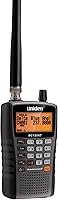
The best police scanners for cars include the Uniden Bearcat BC125AT for portable analog listening, the Uniden SDS200 for digital road trips, and the Uniden Bearcat SR30C for shared vehicle use.
On this page (10 sections)
- The best police scanners for cars by use
- Check these radio system details before spending
- Choose a handheld or a permanent car installation
- Plan power and reception before adding accessories
- Set up useful channel groups before your first drive
- Decide whether GPS will help your routes
- Avoid these common car scanner mistakes
- Keep the scanner ready between trips
- Check car scanner rules before crossing state lines
- Choose the best police scanner for your car by system and route
The best police scanner for car use is the Uniden Bearcat BC125AT for conventional analog listening, while the Uniden SDS200 is the better fit for supported digital trunked systems. Your local radio format decides which belongs in your car.
Start by checking the agencies and channels you want to hear, including those along regular travel routes. A highly rated analog scanner is still the wrong choice for digital traffic.
For home and portable alternatives, see our best police scanners guide. The choices below focus on car use: power, secure placement, changing locations and practical channel management.
Our picks at a glance
-
1
-
2

-
3

The best police scanners for cars by use
Choose the BC125AT for portable analog listening or the SDS200 for a more involved digital vehicle setup. The other picks serve narrower needs, including flexible power, weather listening and conventional digital channels.
Choosing the best police scanner for car travel
Match the scanner to the radio system before comparing convenience features. The scores reflect each model's features and fit for car use, but compatibility takes priority over rank.
A driver staying near home needs a different setup from someone crossing several counties. Focus on the channels you will actually use rather than the largest memory or longest feature list.
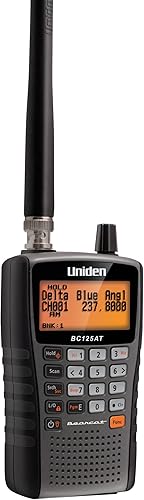
Uniden Bearcat BC125AT
- 500 alpha-tagged channels
- 10 storage banks
- Close Call RF capture
- Analog only
Choose this handheld for named channel groups you can carry between vehicles and other listening spots. It suits conventional analog channels, not digital or trunked systems.
Pros
- Channel names help identify traffic
- 10 banks for organizing routes and services
- Close Call with Do Not Disturb mode
Cons
- Cannot receive digital communications
- Cannot follow trunked systems
The BC125AT suits listeners who want one radio for the car, a nearby event and a desk at home. Its 500 alpha-tagged channels across 10 banks let you name frequencies and separate them by county, service or destination.
That organization matters when you return to the same places often. A bank for your commute and another for weekend travel is easier to manage than one long set of unrelated channels.
Close Call RF capture finds nearby transmitters, and its Do Not Disturb mode avoids Close Call checks during an active transmission. Preset searches also help you explore interests such as aviation, railroads and racing without building every search from scratch.
Pick this model when readable channel names and portable analog listening are your priorities. Skip it if your main goal is digital police traffic or following a trunked system; neither an antenna change nor different programming can add that support.
For a closer look at its channel organization and limits, read our Uniden BC125AT review.
Uniden SDS200
- True I/Q receiver
- 3.5-inch customizable color display
- Built-in US and Canada database
- GPS compatible
The strongest fit here for a planned digital vehicle setup, especially where simulcast reception matters. Its database and location features also suit trips through changing coverage areas.
Pros
- True I/Q receiver designed for challenging simulcast reception
- Database updates through Sentinel
- Automatic location selection with an external GPS receiver
Cons
- Needs substantial mounting space
- GPS receiver and some decoding upgrades are extra
The SDS200 is the strongest fit here for a dedicated digital installation, especially where the target system uses simulcast. Uniden says its True I/Q receiver is designed to handle the reception challenges those systems can create.
Its built-in US and Canada database reduces the need to enter each system from scratch. Sentinel software handles database updates, while Favorites Lists let you narrow listening to the services and areas that matter.
For changing routes, an external GPS receiver can select nearby systems automatically. Without that accessory, you can enter a location manually rather than treating GPS as a requirement for getting started.
The customizable color screen lets you choose which information deserves space. That helps you prepare a clear display before a trip rather than trying to interpret unfamiliar fields on the road.
Choose it for supported digital traffic and frequent travel between coverage areas. Skip it if you mainly need a radio to carry around or have no secure space for a substantial base/mobile unit.
Uniden Bearcat SR30C
- 500 channels
- 10 service banks
- Close Call RF capture
- USB or AA battery power
A portable analog choice for listeners who move between cars and want USB or battery power. Preset searches, priority scan and a delay function help manage everyday listening.
Pros
- USB and AA battery power options
- Delay function helps keep replies together
- PC programming and memory backup
Cons
- Cannot receive digital communications
- AA batteries and a USB power adapter are not included
The SR30C suits an analog listener who changes vehicles or wants a portable radio with flexible power. It can use USB power or 2 AA batteries, including compatible rechargeable Ni-MH cells that can charge in the unit.
Buy the correct batteries and power accessories as part of the setup. The USB cable is included, but the batteries and a USB power adapter are not.
Its delay function is useful for conversation flow because it pauses before moving on, giving a reply time to arrive. Priority scan helps keep selected channels in the scan routine, while key lock reduces accidental changes when handling the radio.
PC programming and memory backup also suit a reusable set of local frequencies. Build a small working set first, then add channels as you learn what is active.
Choose the SR30C when moving the radio between vehicles matters more than building a permanent installation. Skip it for digital communications, and favor the BC125AT if its named-channel organization better fits your listening plan.
Uniden BC355N

- 300 stored frequencies
- 6 service banks
- Close Call RF capture
- Automotive power plug included
A basic base/mobile choice for a car that stays within compatible analog coverage. Included vehicle power connections make it easier to plan a dedicated setup.
Pros
- Automotive power plug and DC cable included
- Backlit display
- Stores frequencies alongside preset searches
Cons
- Cannot receive digital or trunked systems
- Needs a secure mounting location
The BC355N fits a car that will keep a scanner in one place and mainly travel within conventional analog coverage. Its automotive power plug, DC cable and AC adapter give you options for using it in the vehicle and at home.
It stores local frequencies alongside preset searches, so you can keep known channels while exploring other services. The backlit screen helps with reading in dim conditions, though you should set controls and searches before driving.
Choose a mounting position before ordering. Leave room for the antenna connection, power cable and your hand to reach controls while parked; the radio's case dimensions are only part of the space it needs.
This is a sensible alternative to a handheld when battery management is an unwanted chore. Skip it if police monitoring is your sole goal and the agencies you follow use digital or trunked radio, because its broad frequency coverage does not overcome that limit.
Uniden BCD996P2

- 25,000 dynamically allocated channels
- TrunkTracker V
- P25 Phase 1 and 2
- GPS-compatible location scanning
A mobile digital choice for listeners ready to build a route-specific set of systems. Compatible GPS equipment can select those programmed systems as the car moves.
Pros
- Supports several trunked formats
- Large dynamically allocated channel memory
- S.A.M.E. weather alerts
Cons
- Route setup needs programming work
- Location selection needs a compatible GPS receiver
The BCD996P2 suits someone prepared to build and maintain a route-specific digital scanner setup. It supports P25 Phase 1 and Phase 2, plus X2-TDMA, Motorola, EDACS and LTR trunked systems.
Its dynamically allocated memory lets you organize a large set of channels without making equal room for every group. The useful part is the organization, not filling all available memory.
With a compatible GPS receiver, it can select systems you have programmed according to location. Plan those systems and their location settings before a trip rather than expecting the receiver to create a listening plan.
S.A.M.E. weather alerts add another use for the installed radio. They remain a supplement to other weather information, especially when the scanner is occupied with other listening.
Choose this model for supported trunked systems and a setup you are willing to program carefully. Favor the SDS200 when its built-in database and receiver design address your main needs; skip the BCD996P2 if you want a portable handheld.
Whistler WS1010

- 400 channels in 10 banks
- SAME and All Hazards weather alerts
- Skywarn access
- Spectrum Sweeper
An analog handheld for listeners who put weather channels and storm spotter frequencies high on their list. Separate memory banks help keep those interests apart from other radio traffic.
Pros
- SAME and All Hazards weather alerts
- Skywarn frequency access
- Spectrum Sweeper finds nearby transmissions
Cons
- Cannot receive digital communications
- PC programming requires a PCIF cable and third-party software
The WS1010 suits an analog listener whose trips also include weather channels and storm spotter frequencies. SAME and All Hazards alerts, along with Skywarn access, make weather a clear reason to choose it over a basic service-bank scanner.
Its 400 memories are divided into 10 banks. Keep weather-related interests separate from routine local traffic so you can select the relevant groups without scrolling through everything.
Spectrum Sweeper searches for nearby transmissions, while preset service banks offer a starting point for other interests. Neither feature means every channel found will be useful or relevant to your route.
If you want computer programming, include the required PCIF cable and third-party software in your plan. Do not assume any ordinary USB cable will provide that connection.
Choose it for a portable mix of analog services and weather listening. Skip it if your main purpose is digital police monitoring, and do not treat storm spotter traffic as a reason to drive toward dangerous weather.
Uniden BCD260DN

- Conventional DMR and NXDN decoding
- P25 Phase 1 and 2 with free firmware update
- 1,000 alpha-tagged channels
- Trunking not supported
Choose it for compatible conventional digital channels when trunk tracking is unnecessary. DMR and NXDN decoding are included, with P25 decoding added through a free firmware update.
Pros
- DMR and NXDN decoding included
- Free firmware update adds P25 decoding
- Band Scope and tone decode tools aid searches
Cons
- Cannot follow trunked systems
- Cannot decode encrypted signals
The BCD260DN fits listeners who have confirmed that their target digital channels are conventional rather than trunked. DMR and NXDN decoding are included, while a free firmware update adds P25 Phase 1 and Phase 2 decoding.
This distinction is the main buying decision. A system using a familiar digital format can still require trunk tracking, which this scanner does not support.
Its Band Scope, rapid channel tagging and DCS/CTCSS tone decode tools suit people who enjoy identifying and organizing active channels. Those tools are most useful when you already understand the services and frequency ranges you want to explore.
Complete any needed firmware work before installing it in the car. Then save a focused set of channels rather than relying on broad searches during each drive.
Choose it for compatible conventional digital traffic and an interest in search features. Skip it for trunked public safety systems, even if their digital format appears among its decoding options.
Check these radio system details before spending
Identify the format, system structure and encryption status of the channels you want. These checks prevent the most costly mistake: buying a scanner that receives the right frequency range but cannot follow the conversation.
Start with the specific agency or service, not just a county name. Police, fire, EMS and nearby towns may use different systems, even when they serve the same area.
Conventional analog channels use assigned frequencies that an appropriate analog scanner can receive. This is where the portable analog picks and BC355N make sense.
Digital voice requires a scanner that decodes the exact format in use. “Digital scanner” is a category label, not a promise that every digital mode is included.
Trunking lets a system assign conversations across a shared group of frequencies. Following a talkgroup requires compatible trunk tracking rather than simply saving individual voice frequencies.
Encryption is a separate barrier that consumer scanners cannot remove. Check the particular talkgroups you care about, since some traffic on a system may remain clear while other conversations are encrypted.
Simulcast is another detail to check on digital systems. Multiple sites transmitting together can create decoding trouble for some receivers, which is why the SDS200 deserves attention when simulcast is part of the local setup.
Choose a handheld or a permanent car installation
Choose a handheld for frequent removal and a base/mobile unit for a dedicated position in one vehicle. Both still need secure placement, usable power and an antenna suited to your channels.
A handheld works well when you share cars or want to bring the radio indoors afterward. Plan a holder that keeps it upright and restrained, rather than leaving it loose on a seat or in a cup holder.
A base/mobile unit asks for more planning because cables and mounting hardware remain part of the car. Make a paper template of the intended space and include extra clearance behind the radio for connections.
Keep the installation clear of airbags, pedals, shifters, seat tracks and ventilation outlets. A readable screen is useful, but the mounting position must also let you enter and leave the vehicle without catching cables.
Do not choose a radio solely because it fits a dashboard opening. System support, secure attachment and cable access matter more than making the front panel look built in.
Plan power and reception before adding accessories
Start with the correct power source and a secure antenna connection, then work on weak reception. Buying accessories before identifying the problem can add clutter without improving listening.
For a handheld, decide whether you will use batteries, an approved vehicle power setup or both. Follow the model's charging instructions, and never charge alkaline batteries.
For a base/mobile scanner, follow its voltage, polarity and fuse instructions. Any fixed wiring should suit the vehicle and use proper circuit protection; consult a qualified installer if the connection is beyond your skills.
Check whether the chosen power outlet stays live after the ignition is off. That affects both convenience and the chance of leaving equipment running in a parked car.
A car's metal body can limit reception from an antenna inside the cabin. An outside antenna may help, but choose one for your listening bands, connector and mounting location rather than assuming a longer antenna is always better.
Keep antenna cables away from pinch points and moving parts. Avoid crushing cable in doors or routing it across airbag deployment areas.
If reception worsens when a charger or dash camera turns on, electrical noise may be involved. Compare reception with accessories disconnected while parked before replacing the scanner or antenna.
Set up useful channel groups before your first drive
Begin with one local area and a short channel set, then expand after you understand the controls. A focused scan is easier to follow than a radio that stops constantly on unrelated services.
- Confirm the local system details and any required firmware or decoding options.
- Save the channels or systems you actually want, using clear names where supported.
- Group them by area, service or regular route.
- Remove unwanted searches from the normal scan routine.
- Set volume, squelch and display preferences while parked.
- Save a backup through compatible software where available.
Squelch controls when the radio opens its audio on a signal. Set it only high enough to quiet unwanted noise, since an unnecessarily high setting can keep weaker useful signals from opening the audio.
A delay setting can help preserve replies when a conversation pauses. Too much scanning across unrelated channels increases the chance that the radio will be listening elsewhere when the reply begins.
Use temporary holds or lockouts deliberately and review them later. Otherwise, a channel you excluded during one noisy trip may stay absent from your normal scan.
Our Uniden Bearcat programming guide explains the channel setup process in more detail.
Decide whether GPS will help your routes
GPS helps most when you cross several radio coverage areas regularly. It can reduce manual system selection on compatible scanners, but it does not replace correct programming or digital format support.
The SDS200 can work with its database and location information, while the BCD996P2 selects from systems you have programmed. Both need a compatible external receiver for automatic GPS-based selection.
For a short commute in one coverage area, a carefully chosen Favorites List or channel bank may be all you need. Try that simpler arrangement before deciding location equipment is necessary.
Location settings also need sensible boundaries. Selecting too wide an area can make the scanner spend time checking distant systems you cannot receive reliably.
Scanner GPS controls what the radio scans; it does not serve as road guidance. Our car GPS buying guide covers separate navigation equipment.
Avoid these common car scanner mistakes
The biggest mistake is choosing by channel count instead of compatibility. More storage helps organize listening, but it cannot add a missing digital decoder or trunk tracking.
Another mistake is expecting a preset police service bank to contain every current local agency. Preset searches are starting points, and agencies may use systems that require a different setup.
Close Call and Spectrum Sweeper are useful discovery tools, not complete local directories. They depend on nearby active transmissions and should not replace a saved set of known channels.
Do not assume silence means the radio is broken. Check the selected banks, service types, squelch, antenna connection and system activity before changing several settings at once.
Keep the scan list focused enough that you can follow conversations. Hearing fewer relevant channels is often more useful than briefly catching fragments from many services.
A scanner is also a receiver, not a way to join public safety conversations. If you need communication between vehicles, compare the purpose and limits of equipment in our CB radio versus two-way radio guide.
Keep the scanner ready between trips
Care for the connections, saved programming and batteries so the radio is ready when you need it. Most routine problems are easier to spot at home than after the car is packed for a trip.
Inspect power plugs, antenna connectors and mounting points for looseness. Road vibration can work on connections, so secure cables without pulling tightly against the radio's sockets.
Keep the scanner dry and follow its storage temperature guidance. Remove portable equipment from prolonged direct sun, and do not leave loose batteries rolling around the cabin.
Back up channel programming before major edits. For models using databases or firmware updates, complete those jobs with stable power and enough time to confirm that your usual listening setup still works.
Check car scanner rules before crossing state lines
Review the rules where you will drive, including each part of a longer trip. Our guide to police scanner laws in a car explains the questions to check before installation or use.
Vehicle use can raise different questions from listening at home. Check the current official rules for your location and circumstances rather than relying on a radio's availability for sale.
Prepare controls while parked and keep attention on driving. Received traffic may be incomplete or delayed, so do not treat it as an instruction to change routes abruptly or approach an incident.
Choose the best police scanner for your car by system and route
Choose the BC125AT for named, portable analog channels, the SR30C for flexible handheld power, or the BC355N for a fixed analog setup. Pick the WS1010 when weather listening is a major part of your plan.
For compatible digital trunking, favor the SDS200 when its database, location features and simulcast receiver design solve your needs. Choose the BCD996P2 if you are ready to build a programmed route setup, or the BCD260DN specifically for supported conventional digital channels.
Before buying the best police scanner for your car, write down the target system and choose a secure installation spot. If channel availability is still unclear, read whether police scanners still work after agencies go digital before committing to a model.
Our top 3 picks at a glance
-
1
-
2
-
3
Frequently asked questions
Can a handheld police scanner work in a car?
Yes, a handheld police scanner can work in a car when it supports the channels you want to hear. Reception also depends on the antenna, terrain and interference inside the vehicle.
Secure the radio, prepare its channel groups while parked and check the rules that apply along your route.
Do I need a digital scanner for my car?
You need a compatible digital scanner if your target channels use digital voice. You also need trunk tracking if those channels belong to a trunked system.
Check both details before choosing: conventional digital decoding alone does not provide trunk tracking, and no consumer scanner can turn encrypted speech into clear audio.
What is the difference between a base/mobile and handheld scanner?
A handheld scanner is easier to carry between cars and other listening spots, while a base/mobile scanner suits a dedicated installation. Neither design guarantees better reception by itself.
Choose around system support first, then consider secure mounting space, power access, antenna placement and how often you need to remove the radio.
Can a scanner hear encrypted police channels?
No, a consumer police scanner cannot decode encrypted police conversations. Digital voice support and encryption are separate issues, so buying a digital model does not remove that limit.
Check the specific talkgroups you want to hear because one radio system can carry a mix of clear and encrypted traffic.
Does a car police scanner need an outside antenna?
An outside antenna can help when the car body limits reception or the signals you want are weak, but it is not required for every listening situation. Match the antenna to the bands you use and the scanner connection.
Check placement, cable routing and electrical interference before buying extra equipment.