Garmin dēzl OTR620 Truck GPS Review: Worth It? (October 2026)
The Garmin dezl OTR620 suits truck drivers who want help planning unfamiliar deliveries and finding truck stops in a compact navigator. Choose the OTR610 for its full-route planner or the OTR720 for a larger display; several connected tools require a compatible smartphone and the dēzl app.
On this page (10 sections)
- What does the Garmin dēzl OTR620 offer?
- Which Garmin dēzl OTR620 features need a phone?
- How does the OTR620 compare with the OTR610 and OTR720?
- How do you choose the right GPS for your cab?
- How should you set up the OTR620 before the first trip?
- How can arrival planning prevent a poor approach?
- How should you plan parking, breaks and scale stops?
- What mistakes should you avoid with a truck GPS?
- How do you care for the navigator between trips?
- Should you buy the Garmin dēzl OTR620?
The Garmin dezl OTR620 is a strong choice for truck drivers who need help reaching unfamiliar loading docks and planning stops without filling the cab with a large display. Its appeal is the mix of truck routing, overhead destination views and connected driver information.
Choose it for the work around a delivery: finding the truck entrance, checking the approach and deciding where to stop afterward. The OTR610 deserves a look for full-trip planning, while the OTR720 suits drivers who need more screen space.
What does the Garmin dēzl OTR620 offer?
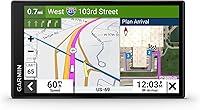
The OTR620 combines routing based on truck size and weight with detailed arrival planning. Its 6-inch touchscreen and North America maps suit drivers who want a dedicated truck navigator in a relatively compact format.
Garmin dēzl OTR620

- 6-inch touchscreen
- Custom truck routing
- BirdsEye Direct Satellite Imagery
- CAT Scale search
A compact choice for drivers who visit unfamiliar facilities and want arrival imagery, truck-stop searches and connected community locations.
Pros
- Overhead destination imagery for approach planning
- Community-shared truck parking and destination locations
- CAT Scale search in the U.S. and Canada
- Wind alerts through the dēzl app
Cons
- Custom truck routing is unavailable in some areas
- Community features and wind alerts need a compatible smartphone and the dēzl app
- PrePass notifications also need an active PrePass account
Custom truck routing accounts for your rig's size and weight, with alerts for upcoming bridge heights and sharp curves. Coverage varies by area, and posted road signs and current road conditions always take priority.
BirdsEye Direct Satellite Imagery adds high-resolution overhead views of destinations. That matters when a street address points toward an office but the truck entrance sits around the back of a large property.
The OTR620 also highlights popular routes used by fellow truckers. Use those as context when reviewing an unfamiliar area, rather than assuming another truck's route suits your vehicle or load.
Its strongest buyer is a driver who regularly visits new facilities and wants more information before the final turn. If you drive the same familiar route every day, consider which of these tools would actually change your routine.
Which Garmin dēzl OTR620 features need a phone?
Community tools and wind alerts require a compatible smartphone running the dēzl app. PrePass weigh station and bypass notifications also require Bluetooth and an active PrePass account.
Community features let you search for truck parking with driver feedback and shared loading docks, security gates and truck entrances. These can help you find a useful starting point before confirming the destination's current instructions.
The wind speed overlay and high-wind alerts add weather context along your route. They should support your decisions about exposed roads and stopping, while current conditions and your load remain central to those decisions.
PrePass notifications are worth considering if you already use that service. Buying the navigator does not replace the account requirement, so include account setup in your preparation if those notifications matter to you.
Before choosing the OTR620, decide whether you'll keep your phone paired during work. A driver who avoids app connections should base the decision on routing and arrival planning, without counting connected tools as everyday benefits.
How does the OTR620 compare with the OTR610 and OTR720?
Choose the OTR620 for unfamiliar destinations, the OTR610 for organizing a complete trip, or the OTR720 for a larger display. All 3 offer truck routing and arrival imagery, so focus on the difference you'll use during a normal shift.
| Model | Screen | Main reason to choose it |
|---|---|---|
| Garmin dēzl OTR620 | 6 in | Arrival planning with community locations, scale search and wind alerts |
| Garmin dēzl OTR610 | 6 in | Full-route planning for fuel, breaks and overnight stays |
| Garmin dēzl OTR720 | 7 in | More display space with the OTR620's main planning tools |
When is the Garmin dēzl OTR620 the better choice?
The OTR620 fits drivers whose main challenge is finding the right approach to a new stop. Its destination views and shared truck locations support that task, while scale and parking searches help with the next part of the shift.
Skip it in favor of the OTR720 if reading from your planned mounting position is the bigger concern. If you already have an OTR610, identify a specific OTR620 feature you need before replacing a navigator that meets your routine.
Who should choose the OTR610?
The OTR610 suits drivers who prefer to review a whole journey before departure. Its route planner helps organize stops across the trip, and its services directory filters truck stops by brand or amenity.
It also offers BirdsEye Satellite Imagery, plus app-connected live traffic and weather. Skip this alternative if your main reason for shopping is the OTR620's community tools and wind overlay, or if you want a larger screen.
Who should choose the OTR720?
The OTR720 suits a cab with room for a larger display, especially when the mount sits farther from the driver. It shares the OTR620's main routing, arrival and connected community tools.
Skip it if the larger unit crowds your view or forces an awkward mounting position. Compare the Garmin dēzl OTR620 and OTR610 around your planning habits, or read our Garmin dēzl vs Rand McNally comparison before choosing a brand.
How do you choose the right GPS for your cab?
Choose around viewing distance, mounting space and the trips you drive, rather than assuming a larger navigator is always better. A screen only helps if you can read it without blocking your view or reaching awkwardly.
While parked, check the intended mount position from your normal driving posture. Leave room for dashboard controls, mirrors and a power cable that won't cross your working area.
Think about your route pattern next. A driver covering new industrial sites has different needs from someone repeating a known depot run, even when both drive similar trucks.
If you mainly drive a passenger vehicle, start with truck GPS vs car GPS before paying for truck-specific functions. The useful distinction is whether your vehicle needs routing that accounts for its size and weight.
For other truck options, see our best truck GPS navigators. Compare the tools you expect to use each week, rather than choosing by the longest feature list.
How should you set up the OTR620 before the first trip?
Enter accurate vehicle details, secure the mount and review a familiar journey before using it for work. Complete setup while parked so your first unfamiliar delivery doesn't become a lesson in the menus.
Start with these steps:
- Check the truck details. Use the dimensions and weight information for the rig you're driving, including its current trailer configuration.
- Fit the mount and power cable. The OTR620 includes a vehicle suction cup mount and vehicle power cable; keep the cable clear of controls and moving parts.
- Check your map maintenance plan. Allow time before departure for any necessary updates.
- Pair the phone if needed. Confirm the app connection and any account setup for the connected tools you plan to use.
- Review a known route. Check the proposed approach and stop locations while you have time to spot unexpected suggestions.
Repeat the vehicle-profile check when you change trucks or trailers. A saved profile can become the wrong profile after a change in equipment.
Set a readable screen angle and useful guidance volume before moving. If the navigator shows an unexpected position, our guide to why a car GPS shows the wrong location explains common positioning problems.
How can arrival planning prevent a poor approach?
Review the truck entrance before the final approach, especially at large industrial properties. An address gets you to the destination area, but you still need to identify which entrance the facility wants trucks to use.
Look at the relationship between the public road, entrance, gate and loading area. Check whether the approach appears to require a turn that deserves closer review or a call to the receiving office.
When using community-shared locations, match the suggested entrance to your delivery instructions. A useful location for one driver may lead to a different tenant, gate or loading area within the same property.
Satellite imagery shows layout, not permission to enter. Construction, temporary closures and changed traffic flow can make a previously useful approach unsuitable.
If directions conflict, stop in a suitable place and contact the facility before committing to a narrow access road. Avoid making the last turn first and trying to solve the entrance problem afterward.
How should you plan parking, breaks and scale stops?
Plan a primary stop and a backup before you need either one. The OTR620's break planning, truck-friendly parking information and Truck & Trailer Services directory help you build that plan.
Search by the service you need, such as showers, rather than selecting a stop only because it's close. Then check that its position makes sense for your route and the direction of travel.
CAT Scale search covers locations in the U.S. and Canada. Finding a nearby scale helps you plan a weight check, but only weighing the truck tells you its measured weight.
Treat community parking feedback as a guide to possible stops. It does not reserve a space or establish that parking will remain available when you arrive.
Choose an earlier decision point for checking your backup. Waiting until the first location is full can leave you with fewer practical options and more pressure to improvise.
For mixed vehicle use, our GPS navigator buying guide explains how priorities differ across cars, trucks and RVs.
What mistakes should you avoid with a truck GPS?
Keep the vehicle profile current and question route suggestions that conflict with the road ahead. The most useful navigator still depends on correct input and sound driving decisions.
Don't follow a familiar-looking shortcut just because it appears on the map. Check restrictions and access before leaving the reviewed route, particularly when a diversion takes you onto smaller roads.
Avoid treating a shared truck route as proof of clearance. Different trailers, loads and vehicle dimensions can change which roads are suitable.
Don't confuse a community parking location with confirmed availability, or a scale location with a completed weight check. Those tools help you find places where the next task can happen.
Also avoid buying around connected features you won't set up. Confirm phone compatibility and account needs before those features become part of your buying decision.
Finally, pull over somewhere suitable before changing destinations or making detailed route edits. Preparing stops before departure reduces the need to handle those choices during the drive.
How do you care for the navigator between trips?
Keep the screen, mount and power connection clean and secure so the unit stays readable and stable. Small checks before departure are easier than adjusting a slipping mount during a shift.
Use a clean, soft cloth on the screen and follow Garmin's cleaning instructions. Avoid abrasive materials, and keep liquids away from openings and cable connections.
Check the mounting surface and suction attachment before driving, especially after removing and refitting the unit. Reposition the mount if it loosens rather than relying on the cable to hold the navigator.
Inspect the power cable for pinching or wear where it passes dashboard edges. Store the navigator securely when removed so the screen and connector aren't knocked by loose cab items.
Should you buy the Garmin dēzl OTR620?
Buy the Garmin dezl OTR620 if unfamiliar delivery approaches and stop planning are regular parts of your work, and you want those tools in a compact navigator. Its value depends on using that destination information before the difficult turn.
Choose the OTR610 if organizing fuel, breaks and overnight stays across a full trip is your priority. Choose the OTR720 if your mounting position calls for more display space.
Keep your current navigator if it already handles your routes and none of these differences solves a clear problem. For ongoing map care, follow our guide to Garmin dēzl map updates.
Frequently asked questions
Is the Garmin dēzl OTR620 a truck GPS?
Yes, the Garmin dēzl OTR620 provides custom routing based on truck size and weight, plus alerts for upcoming bridge heights and sharp curves. Custom routing is unavailable in some areas, so enter accurate vehicle details and follow posted signs, road conditions and facility instructions throughout your trip.
Does the Garmin dēzl OTR620 need a phone?
A compatible smartphone running the dēzl app is required for community parking and destination features, plus wind alerts; PrePass notifications also need Bluetooth and an active PrePass account. Separate these connected tools from the navigator's truck routing and arrival imagery when deciding how much phone pairing matters to you.
What is the difference between the Garmin dēzl OTR620 and OTR720?
The main buying difference is display size: the OTR620 has a 6-inch touchscreen and the OTR720 has a 7-inch touchscreen. Both offer custom truck routing, BirdsEye Direct Satellite Imagery, CAT Scale search and connected community tools, so choose around viewing distance and available mounting space.
Can the Garmin dēzl OTR620 route every truck safely?
No GPS can guarantee that every suggested road suits your truck, and the OTR620's custom truck routing is unavailable in some areas. Keep your vehicle profile accurate, review unfamiliar approaches before driving and follow posted restrictions and current conditions whenever they differ from the suggested route.